How to Choose a 3D Rendering Studio: A Developer’s Evaluation Guide
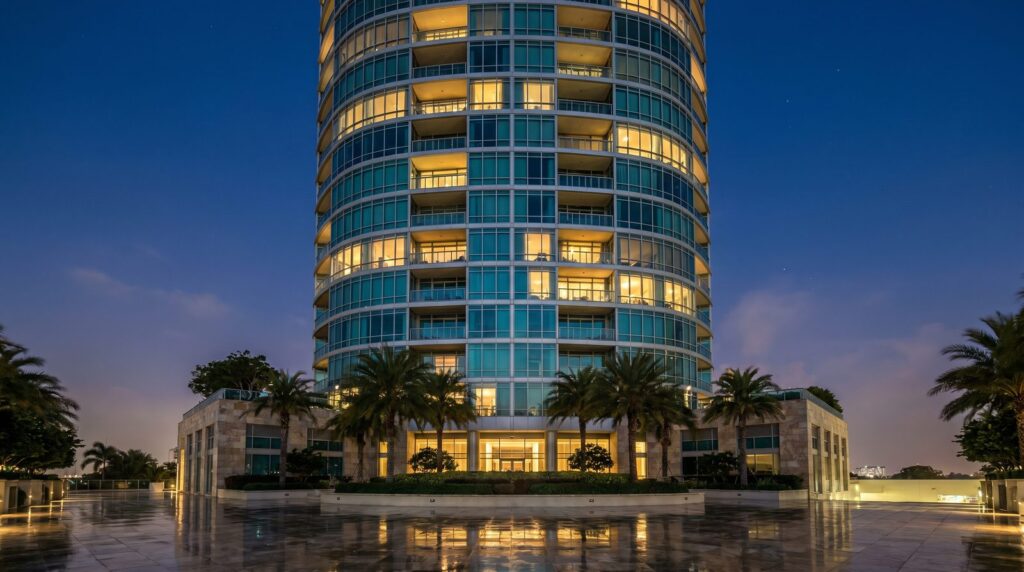
When choosing a 3D rendering studio for a development project, look for a portfolio that matches your building type, a clearly documented revision policy, realistic turnaround commitments backed by team capacity, and a structured briefing process. Studios that ask smart questions before quoting — about site context, lighting intent, and marketing end-use — consistently deliver faster, more accurate results than those who jump straight to a price.
What Services Should a Studio Actually Offer?
A capable studio should cover the full visualization stack your project may need, not just one output type. At minimum, look for exterior rendering, interior rendering, aerial or site-context views, and 3D floor plans. If you are selling off-plan or running a pre-sales campaign, the ability to produce landscape and pool renders — or a short architectural animation — from the same model saves significant time and cost.
In our exterior work, for example, we build a single scene that can generate a dusk hero shot, a daytime street-level view, and an aerial context frame without rebuilding geometry. That kind of multi-output workflow matters when your marketing team needs six deliverables from one site visit’s worth of input.
- Exterior rendering — street-level, aerial, dusk, and context views
- Interior rendering — kitchen, living, lobby, amenity, and bedroom suites
- Landscape & pool rendering — outdoor living, hardscape, resort-style amenity decks
- 3D floor plans — for listings, brochures, and investor decks
- Architectural animation — walkthroughs and flyovers for pre-sales or planning approval
- Aerial / masterplan rendering — site context, phasing diagrams, community overviews
If a studio only offers one or two of these, you risk having to re-brief a second vendor mid-project — a schedule risk most developers cannot afford. See our full exterior rendering services for an example of what a complete exterior scope looks like.
How Do You Evaluate Portfolio Quality Before Signing?
Portfolio quality is the single most reliable signal of what you will actually receive. Look past the hero images and examine whether the studio has produced work for your building type, at your scale, and in a comparable climate or material palette.
Four things to check in any portfolio:
| Quality Signal | What to Look For | Red Flag |
|---|---|---|
| Lighting realism | Accurate shadow direction, soft bounce light, believable dusk glow | Blown-out highlights, flat ambient light, no shadow variation |
| Material fidelity | PBR-accurate glass, concrete with micro-texture, wood grain that reads at distance | Plastic-looking surfaces, tiled textures visible at normal viewing distance |
| Context integration | Landscaping, entourage, and sky that match the project’s real geography | Generic European streetscapes on a Florida coastal project |
| Building-type match | Multifamily, commercial, hospitality, or retail work similar to your project | Only single-family residential examples when you’re developing a condo tower |
Ask the studio to show you a before-and-after of their briefing inputs versus the final render. This reveals how much they interpreted versus how faithfully they executed. Strong studios can show the architect’s PDF or Revit export alongside the finished image — the gap between those two tells you everything about their modeling and art direction capability.
What Questions Should You Ask About Turnaround and Revisions?
Turnaround and revision terms are where most developer-studio relationships break down. Before signing, get clear answers to five specific questions.
- What is the standard turnaround from approved brief to first draft? A well-resourced studio should give you a specific number of business days, not “it depends.”
- How many revision rounds are included, and what counts as a revision? Changing a material swatch is different from repositioning the camera angle — make sure the contract distinguishes them.
- At what stage can you request changes without a scope-change fee? Most studios allow free changes before final render approval; changes after high-resolution output typically incur additional cost.
- Is rush delivery available, and what does it require from your side? Rush rendering requires complete, conflict-free input files — if your drawings are still being coordinated, a rush fee will not actually accelerate delivery.
- Who is your point of contact, and what is their response-time commitment? A single named project manager is worth more than a general inbox.
Our own process at Ratio Visuals uses a structured brief checklist — you can review the 3D rendering project brief checklist we send every client before we model anything. It forces alignment on camera angles, lighting intent, and material selections before a single polygon is placed, which cuts revision cycles significantly.
In-House Team vs. Outsourced Studio: Does It Matter?
For most developers, an outsourced specialist studio outperforms an in-house team on quality, speed, and total cost — but the right answer depends on your rendering volume and internal coordination capacity.
An in-house renderer gives you maximum control and zero briefing overhead. The trade-off is that you carry the full cost of hardware, software licenses, and a skilled artist’s salary regardless of project load. When your pipeline is thin, that fixed cost is hard to justify.
An outsourced studio scales with your deal flow. You pay per project, access a team with specialized hardware (GPU render farms, calibrated color workflows), and benefit from artists who have solved your exact problem — dusk lighting on glass curtain walls, for instance — dozens of times. The briefing overhead is real, but a studio with a strong intake process reduces it to a single structured call and a checklist.
We cover this decision in depth in our in-house vs. outsourced rendering guide, including the volume threshold at which in-house starts to make financial sense.
What Red Flags Signal a Studio Will Miss Your Deadline?
Deadline misses in rendering almost always trace back to the same root causes. Learn to spot them during the sales conversation, before you sign.
- No project manager named at intake. If the sales contact is also the person “who handles everything,” capacity is likely constrained and accountability is diffuse.
- Vague turnaround language. “Usually about two weeks” is not a commitment. A studio confident in its capacity gives you a specific date.
- No brief process. Studios that skip structured intake will start modeling on incomplete information, then lose time to rework when misalignments surface late.
- Portfolio images that all look the same. A narrow aesthetic range suggests a small team or heavy use of template scenes — both limit flexibility and can slow delivery when your project doesn’t fit the template.
- Reluctance to show work-in-progress examples. Transparent studios show WIP drafts; studios that only show finished heroes may be hiding a rough intermediate process.
- No written revision policy. Unlimited revisions sounds appealing until it becomes the reason your project stalls in feedback loops for weeks.
How Much Should a Developer Budget When Comparing Studios?
Because rendering cost varies significantly by scope, quoting a single number here would be misleading. What actually drives the cost of a render package is more useful to understand.
Primary cost drivers:
- View count. Each camera angle is a separate deliverable. A six-view exterior package costs materially more than a two-view package, even from the same scene.
- Building complexity. A simple rectangular mid-rise models faster than a mixed-use tower with articulated facades, canopies, and custom curtain-wall details.
- Interior scope. Fully furnished and styled interior renders require more art direction time than exterior views built from the same architectural model.
- Lighting conditions. Dusk and twilight renders require additional HDR setup and longer render times than standard daytime shots.
- Animation length. A 60-second architectural walkthrough is a fundamentally different scope from a set of stills — frame count, camera choreography, and render time scale accordingly.
- Input file quality. Clean Revit or SketchUp files with consistent layer naming reduce modeling time; hand-drawn PDFs or incomplete drawings add hours.
For a detailed breakdown of what affects the cost of a project like yours, visit our 3D rendering cost guide. When comparing studio quotes, make sure each quote specifies view count, resolution, revision rounds included, and file format — otherwise you are comparing different scopes, not different prices.
What Does a Strong Client Brief Process Tell You About a Studio?
A studio’s intake process is the clearest proxy for the quality of its output. Studios that ask detailed questions before quoting — about the project’s marketing end-use, the target buyer, preferred lighting mood, material palette, and surrounding context — are studios that have learned, through experience, that vague input produces expensive rework.
Specifically, look for a studio that asks:
- What is the primary marketing use of these images (listing, investor deck, billboard, social)?
- What time of day and season should the renders depict?
- Do you have reference images that capture the mood you want?
- What file formats do your drawings exist in, and how complete are the material specifications?
- Who is the final approver, and how many stakeholders will review drafts?
A studio that skips these questions is not being efficient — it is deferring problems to the revision stage, which is the most expensive place to solve them. Our own studio selection guide walks through the full evaluation checklist we recommend developers use before signing any rendering contract.
Frequently Asked Questions
How long does it typically take a 3D rendering studio to deliver a first draft?
For a standard exterior render package with two to four views, most established studios deliver a first draft in five to ten business days from receipt of a complete brief. Complex projects with custom modeling, interior suites, or animation will take longer. Rush delivery is possible but requires complete, conflict-free input files from day one.
Should I choose a local studio or does location not matter?
For most rendering projects, location is irrelevant. A well-run studio anywhere in the US — or operating remotely — can deliver photorealistic results if you provide thorough input files and clear feedback. What matters is the studio’s brief process, communication responsiveness, and portfolio match to your building type, not their zip code.
How many revision rounds should a rendering contract include?
Two structured revision rounds — one after the draft and one after initial feedback — is the industry standard for a well-briefed project. More rounds usually signal a brief that was incomplete at the start. Always confirm in writing what constitutes a revision versus a scope change, since material swaps and camera repositions are treated differently by most studios.
What file formats should I provide to a rendering studio?
Revit (.rvt), SketchUp (.skp), AutoCAD (.dwg), and PDF plans with elevations are all workable starting points. The cleaner and more complete the file — with consistent layer naming, accurate dimensions, and material callouts — the faster the studio can model and the fewer clarification rounds you will need before the first draft.
Is a cheaper studio quote always a worse result?
Not always, but a significantly lower quote usually signals fewer revision rounds included, lower output resolution, template scenes rather than custom modeling, or longer turnaround. Compare quotes line by line: view count, resolution, revisions included, and delivery format. A quote that looks lower but excludes two revision rounds may cost more in change-order fees by the end.
Ready to evaluate Ratio Visuals for your next development project? Send us your brief and we will respond with a scoped proposal — view count, turnaround, and revision terms included — within one business day.
Last updated: July 2026