Multifamily Lease-Up Renders: A Campaign Checklist
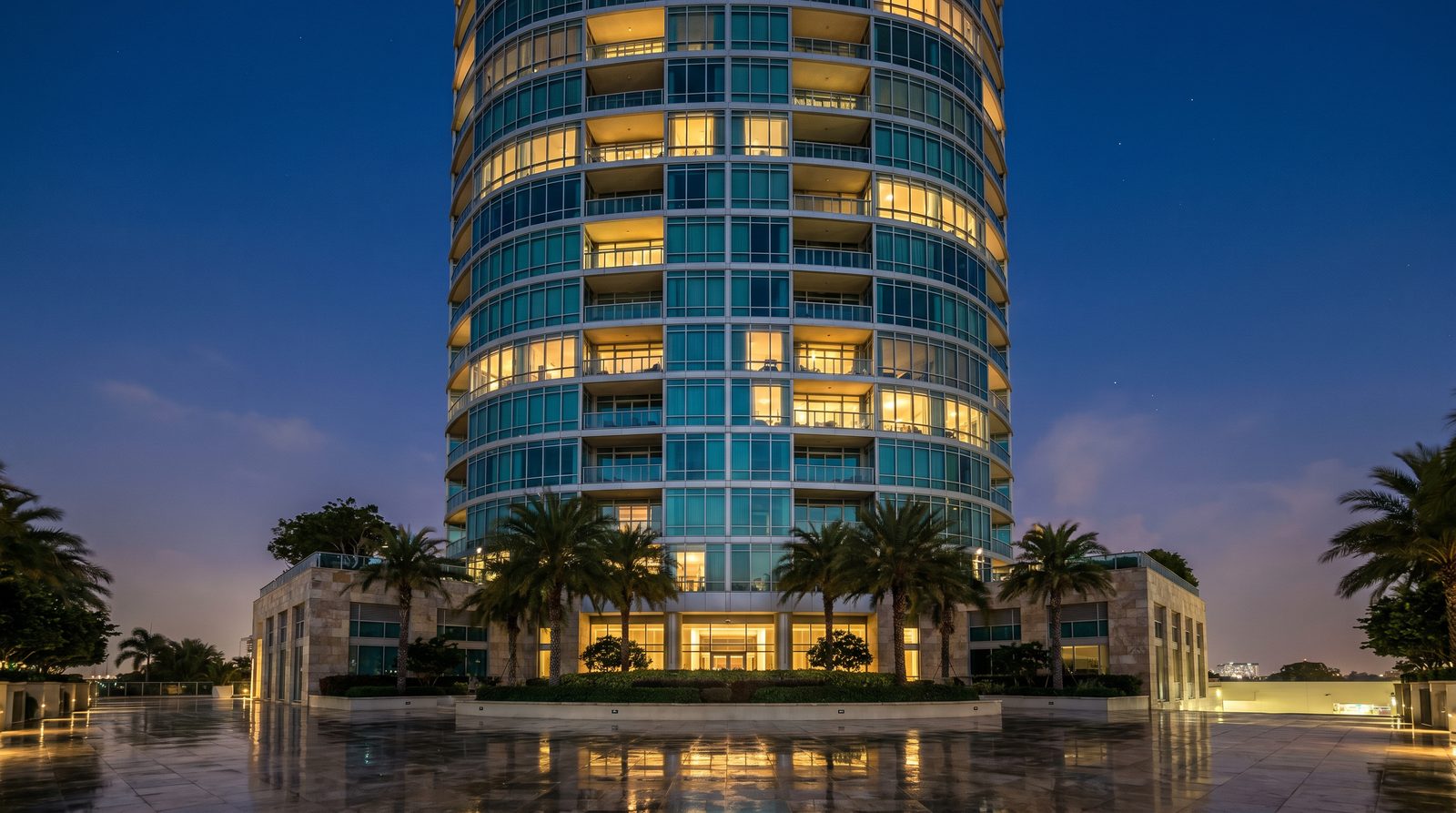
A successful multifamily lease-up render campaign requires at minimum one photorealistic exterior hero, two to three lifestyle interior views, a pool or amenity render, and an aerial site view — all delivered before the building certificate of occupancy. Produce them in parallel with construction drawings, not after, so your leasing website, signage, and ILS listings go live the day you open the waitlist.
Why Renders Drive Lease-Up Velocity
Prospective renters sign leases on units they have never physically entered. Photorealistic renders close that gap by letting a prospect visualize the kitchen finishes, the pool deck at dusk, and the view corridor before a single wall is framed. In our work with US multifamily developers, projects that launch with a full render suite consistently fill their waitlists faster than those relying on floor plans alone — because the renders do the storytelling a floor plan cannot.
The render campaign also anchors every downstream marketing channel: the leasing website hero banner, printed brochures, digital ads, ILS listings (Apartments.com, Zillow Rentals, CoStar), and the leasing office display wall all pull from the same asset library. Producing that library once, correctly, is far cheaper than re-commissioning assets piecemeal.
The Complete Render Asset Checklist
Below is the standard asset list we recommend for a mid-rise or garden-style multifamily lease-up. Adjust scope up for a high-rise tower or mixed-use podium; a smaller build-to-rent community can trim to the essentials column.
| Asset | Purpose | Priority | Typical Lighting |
|---|---|---|---|
| Exterior hero — primary façade | Website banner, signage, OOH ads | Essential | Golden hour or dusk |
| Exterior — secondary angle or entry | Brochure, ILS secondary images | Essential | Midday or overcast |
| Aerial / site context | Investor deck, neighborhood story | Essential | Midday |
| Living room — flagship unit | ILS hero interior, digital ads | Essential | Natural window light |
| Kitchen — flagship unit | Finish-package marketing, social | Essential | Natural + under-cabinet |
| Primary bedroom | ILS listing, brochure | Essential | Soft morning light |
| Pool deck / outdoor amenity | Lifestyle marketing, social | Essential | Late afternoon or dusk |
| Lobby / co-working lounge | Amenity storytelling, brochure | Recommended | Interior ambient |
| Fitness center | Amenity differentiation | Recommended | Interior ambient |
| Alternate unit finish package | Upsell premium tier | Optional | Match flagship |
| Walkthrough animation (60–90 sec) | Social video, leasing kiosk | Optional | Mixed |
| 3D floor plans | ILS, brochure inserts | Recommended | N/A |
When to Commission Each Asset
Timing is the variable most developers underestimate. Renders should be commissioned at design-development phase — not at permit issuance. Here is the production sequence that keeps a lease-up campaign on schedule.
Phase 1: Schematic Design (SD) — Aerial and Exterior Hero
The exterior hero and aerial context render can be started as soon as massing is locked and a material palette is defined. These assets have the longest lead time because they require full site modeling, landscaping, and entourage. Starting here means your leasing website domain and social channels can launch with hero imagery the moment you announce the project.
Phase 2: Design Development (DD) — Interiors and Amenities
Interior renders require finish selections: cabinet profiles, countertop materials, flooring, plumbing fixtures, and lighting. At DD phase, your interior designer or design-build team should be able to provide a finish board. We use PBR (physically based rendering) materials matched to manufacturer specifications, so the closer the brief is to final selections, the fewer revision rounds you need. See our notes on how interior finish boards feed directly into the render process.
Phase 3: Construction Documents (CD) — Amenity Renders and 3D Floor Plans
Pool deck, fitness center, and lobby renders can be finalized once MEP coordination is complete and amenity layouts are confirmed. 3D floor plans are produced from the final unit plans and are typically the last asset in the queue — but they are fast to produce once the drawings are clean.
What to Provide Your Studio (The Brief Checklist)
Incomplete briefs are the single biggest cause of delays and revision rounds. Before your kickoff call, assemble the following:
- Architectural drawings: Site plan, floor plans, elevations, and sections in DWG or PDF. The more complete, the better the model accuracy.
- Finish schedule / material board: Manufacturer names, product codes, and finish colors for all visible surfaces. If selections are still in progress, flag which items are confirmed vs. placeholder.
- Landscape plan: Planting plan, hardscape layout, pool or water-feature details, and any site furniture specs.
- Brand guidelines: Logo, color palette, and any type treatments your leasing agency has established — so renders match the campaign identity.
- Camera preferences: Reference images showing the angle, mood, and time of day you want. Pinterest boards, competitor projects, or magazine tearsheets all work.
- Lighting direction: Specify golden hour, dusk/twilight, midday, or overcast for each render. Dusk exteriors with lit interiors visible through glazing are consistently the strongest lease-up hero images in our experience.
- People and lifestyle: Confirm whether you want lifestyle figures (residents using the pool, walking the corridor) and at what density. Lifestyle-populated renders outperform empty-building shots in leasing ad performance.
- Delivery format: Print-ready (300 dpi, TIFF or PNG) for signage; web-optimized (72–96 dpi, JPG) for ILS and digital. Request both from the start.
Exterior Renders: What Makes a Lease-Up Hero Shot Work
The exterior hero is the first image a prospect sees — on the ILS listing, the leasing banner, or the billboard on the adjacent arterial. It needs to do three things at once: communicate the building's scale and quality, evoke the lifestyle, and look photographic enough that a prospect does not consciously register it as a render.
In our exterior work, dusk lighting with warm interior glow visible through windows is the most effective treatment for multifamily lease-up. It suggests occupancy — the building feels lived-in — and the contrast between warm interior light and a blue-hour sky gives the image cinematic depth that midday shots rarely achieve. Pair it with a lush, fully mature landscape (even if the real plantings will take years to fill in) and lifestyle figures at the entry. Explore our exterior rendering service for examples of this approach across building types.
Interior Renders: Selling the Unit Before Move-In
Interior renders for lease-up serve a different purpose than design-approval renders. They are lifestyle images, not technical documentation. The kitchen render should show the countertop material catching natural light from the window, a bowl of fruit on the island, and the living space visible beyond — not a clinically lit orthographic view.
Camera height matters: eye-level shots at roughly 5 feet feel residential and comfortable. Wide-angle lenses (24–28mm equivalent) make rooms read larger without distorting to the point of dishonesty. Global illumination with HDRI sky lighting through windows produces the soft, realistic shadows that separate photorealistic renders from the flat, overlit CGI that prospects have learned to distrust. Our interior rendering service covers unit interiors, amenity spaces, and lobby environments.
For developers offering multiple finish tiers, a single base room model can be re-lit and re-textured for each package — an efficient way to market premium upgrades without commissioning entirely new scenes. This is also where finish board renders pay for themselves at the leasing desk.
Amenity and Landscape Renders: The Differentiator
In competitive multifamily markets, the unit itself is table stakes. The pool deck, the rooftop lounge, the dog run, the co-working space — these are the images that tip a prospect from interest to application. Amenity renders need to be populated: people swimming, residents at outdoor tables, a dog on the lawn. Empty amenity renders feel like a hotel brochure nobody checked into.
Pool and landscape renders require the same level of detail as the exterior hero. Planting species, deck material texture, water reflectivity, and shadow patterns from overhead structures all affect believability. A dusk pool render with underwater lighting and warm string lights overhead is one of the highest-performing single images in a lease-up campaign. See how we approach outdoor living and landscape visualization for multifamily and mixed-use projects.
Aerial and Site Context: The Investor and Broker View
An aerial render serves two audiences: the investor deck (showing site control, access, and neighborhood context) and the leasing prospect (communicating walkability, proximity to amenities, and the building's relationship to the street). For urban infill projects, an aerial that shows the surrounding block and street network is often more persuasive than a close-up façade shot because it answers the prospect's first question: "Where exactly is this, and what's around it?"
Aerial renders are also the asset most likely to be reused across the project's lifecycle — from the initial entitlement presentation through to the eventual sale or refinance. Producing a high-quality aerial at the start of the campaign is one of the best investments in the asset library. If you work with commercial brokers, our notes on what brokers need from renders to close deals are directly relevant here.
Cost Drivers for a Lease-Up Render Package
Because every project differs in scope, complexity, and finish level, render packages are quoted individually rather than published as fixed rates. The factors that most influence the investment are: number of distinct scenes, building scale and model complexity, level of landscape and entourage detail, number of finish variations, animation length (if included), and turnaround timeline. A straightforward garden-style community with six stills costs significantly less than a high-rise tower with multiple finish packages and a 90-second walkthrough. For a detailed breakdown of what drives render pricing, see our rendering cost guide.
Common Mistakes That Stall a Lease-Up Campaign
- Starting too late. Commissioning renders after permit approval means the leasing website launches weeks or months after it should. Start at design development.
- Incomplete material selections. Placeholder finishes require revision rounds that extend delivery timelines. Lock selections before briefing interiors.
- Skipping lifestyle population. Empty renders underperform in digital advertising. Budget for lifestyle figures from the start.
- Single-use file formats. Requesting only web-resolution JPGs creates problems when the signage vendor needs print-ready files. Always request both.
- Treating renders as a one-time cost. The asset library built for lease-up can be repurposed for the investor refinance deck, the disposition package, and future phases. Archive source files with your studio.
For a broader look at how renders serve the full development cycle, our real-estate rendering overview covers pre-sales, lease-up, and investor presentations in one place.
FAQ
How many renders does a multifamily lease-up campaign typically need?
Most mid-rise multifamily lease-up campaigns require six to ten stills: one or two exterior views, an aerial, two to three unit interiors, and one to two amenity renders. Larger mixed-use or high-rise projects often need twelve or more. Start with the essential eight and add scenes based on your marketing channel requirements.
When should multifamily lease-up renders be commissioned?
Commission exterior and aerial renders at design-development phase — as soon as massing and materials are defined. Interior and amenity renders follow once finish selections are confirmed. This timeline ensures your leasing website and ILS listings launch with full imagery when you open the waitlist, not months later.
What file formats should I request for lease-up renders?
Request print-ready files (300 dpi, PNG or TIFF) for signage, brochures, and large-format displays, and web-optimized JPGs for ILS listings, digital ads, and website use. Requesting both formats upfront avoids a second delivery round when the signage vendor needs higher resolution than the web files provide.
Can the same renders be used for the investor deck and the leasing campaign?
Yes — the exterior hero and aerial render are the most reusable assets in the library. Investor decks typically use the aerial and exterior alongside a site plan; leasing campaigns lead with lifestyle interiors and amenity renders. Producing a single high-quality asset library that serves both audiences is more cost-efficient than commissioning separate deliverables for each.
How is a lease-up render different from a design-approval render?
A design-approval render documents the building accurately for an architect, planning board, or client review. A lease-up render is a marketing image: it is lit for drama, populated with lifestyle figures, styled with mature landscaping, and composed to evoke the experience of living there. Both must be accurate, but the lease-up render prioritizes emotional resonance over technical documentation.
Ready to build your lease-up render library? Contact Ratio Visuals for a project quote.
Last updated: November 2026